
Programmer | DevTools & Open Source
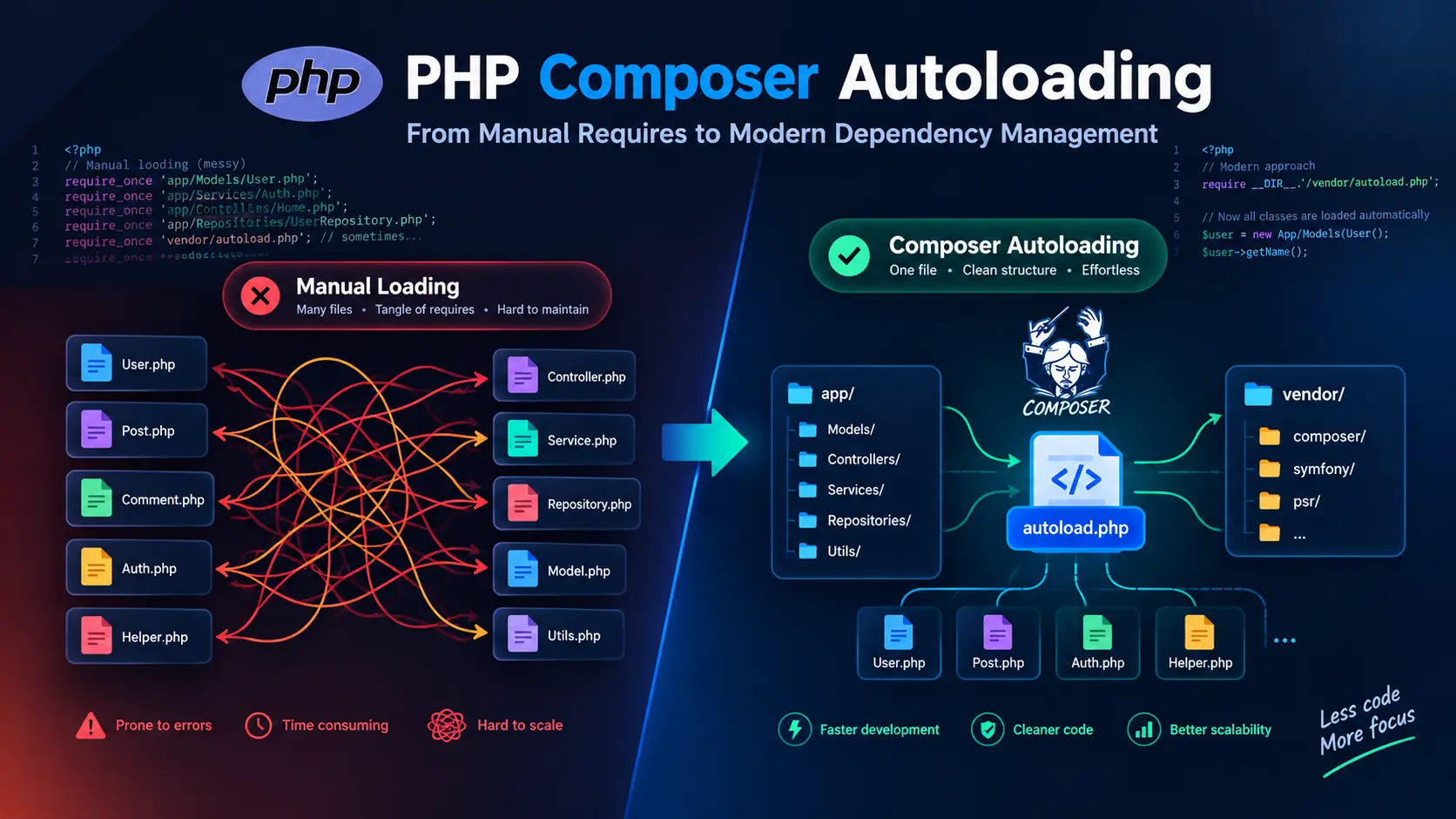
PHP Composer Autoloading - From Manual Requires to Modern Dependency Management
Learn how Composer autoloading eliminates manual file includes and simplifies PHP dependency management.
Managing file dependencies in PHP used to mean writing dozens ofrequire_oncestatements at the top of every file. Miss one, and your app crashes. Add a new class, and you’re updating multiple files. It doesn’t scale.
Composer fixed this with automatic class loading. This guide shows you how it works, comparing the old manual way against Composer’s autoloader with real examples you can use.
Project structure overview
Before diving into the code, let’s see the complete directory structure for both approaches.
Example 1: Manual Loading Structure
example/
├── index.php
├── models/
│   ├── User.php
│   ├── Post.php
│   └── Comment.php
└── helpers/
    ├── validation.php
    ├── database.php
    └── auth.php
Example 2: Composer Autoloading Structure
example-2/
├── .gitignore
├── composer.json
├── composer.lock
├── index.php
├── models/
│   ├── User.php
│   ├── Post.php
│   └── Comment.php
├── helpers/
│   ├── validation.php
│   ├── database.php
│   └── auth.php
└── vendor/                    (generated by Composer)
    ├── autoload.php
    ├── composer/
    │   ├── autoload_classmap.php
    │   ├── autoload_files.php
    │   ├── autoload_namespaces.php
    │   ├── autoload_psr4.php
    │   ├── autoload_real.php
    │   ├── autoload_static.php
    │   ├── ClassLoader.php
    │   ├── installed.json
    │   ├── installed.php
    │   └── platform_check.php
    └── fakerphp/
        └── faker/
            └── [Faker library files]
Key differences:
- Manual: Simple structure requiring 6+
require_oncestatements in every entry point - Composer: Adds
composer.json,composer.lock, andvendor/directory with a single autoload entry point
The problem with manual loading
Before autoloading, every PHP file needed explicit includes:
<?php

require_once './models/User.php';
require_once './models/Post.php';
require_once './models/Comment.php';

require_once './helpers/validation.php';
require_once './helpers/database.php';
require_once './helpers/auth.php';

App\Helpers\validateEmail('[email protected]');
$user = new App\Models\User();
Problems with this:
- Forget one file → crash
- Add a class → update every entry point
- No package management
- Path hell when you reorganize
I’ve seen codebases with hundreds of these scattered everywhere.
How Composer autoloading works
Composer generates one autoloader that handles all your class and function loading. Configure it once, and you’re done.
How it works:
- Your app includes
vendor/autoload.phponce - The autoloader registers with PHP’s class loading system
- When you use
new App\Models\User(), PHP asks the autoloader - The autoloader checks its classmap and PSR-4 rules
- It loads the correct file (
src/Models/User.php) - Your class is available—no manual
require_onceneeded
The autoloader intercepts class requests and loads files based on namespace rules. You never touchrequire_onceagain.
Install Composer:
# Linux/Mac
curl -sS https://getcomposer.org/installer | php
sudo mv composer.phar /usr/local/bin/composer

# Windows (download from getcomposer.org)
Setting up basic autoloading
Create acomposer.jsonfile in your project root:
{
  "autoload": {
    "files": [
      "helpers/validation.php",
      "helpers/database.php",
      "helpers/auth.php",
      "models/User.php",
      "models/Post.php",
      "models/Comment.php"
    ]
  }
}
Generate the autoloader:
composer dump-autoload
This createsvendor/autoload.phpwhich handles all your includes. Now your code becomes:
<?php
require_once 'vendor/autoload.php';

App\Helpers\validateEmail('[email protected]');
$user = new App\Models\User();
One line replaces six includes. Add ten more classes? Still one line.
Autoloading strategies
Composer has four autoloading strategies. Pick based on your project structure.
Files autoloading
For functions and procedural code:
{
  "autoload": {
    "files": ["src/helpers.php", "src/functions.php"]
  }
}
These load on every request. Keep the list short.
PSR-4 autoloading
The modern standard. Maps namespaces to directories:
{
  "autoload": {
    "psr-4": {
      "App\\": "src/",
      "App\\Controllers\\": "src/Controllers/"
    }
  }
}
A classApp\Models\Userloads fromsrc/Models/User.php. No config needed for new classes—just follow the namespace convention.
Here’s how PSR-4 maps namespaces to file paths:
graph TD
    A["App\Models\User"]
    A --> B[Remove base namespace]
    B --> C["Models\User"]
    C --> D[Convert to path]
    D --> E["Models/User"]
    E --> F[Add base directory]
    F --> G["src/Models/User.php"]
Examples of namespace to file mapping:
| Namespace | File Path |
|---|---|
App\Models\User | src/Models/User.php |
App\Controllers\HomeController | src/Controllers/HomeController.php |
App\Services\Auth\LoginService | src/Services/Auth/LoginService.php |
App\Helpers\StringHelper | src/Helpers/StringHelper.php |
Classmap autoloading
Scans directories and builds a class-to-file map:
{
  "autoload": {
    "classmap": ["src/", "lib/"]
  }
}
Works with any directory structure but requires runningcomposer dump-autoloadafter adding classes. Useful for legacy code that doesn’t follow PSR-4.
PSR-0 autoloading
The older standard. PSR-4 replaced it, but some legacy packages still use it:
{
  "autoload": {
    "psr-0": {
      "Vendor\\Package\\": "src/"
    }
  }
}
Use PSR-4 for new projects.
Adding external packages
Composer’s real power comes from package management. Add any package from Packagist:
composer require fakerphp/faker
This command:
- Downloads the package and its dependencies
- Updates
composer.jsonwith the requirement - Creates/updates
composer.lockwith exact versions - Regenerates the autoloader
Now use the package immediately:
<?php
require_once 'vendor/autoload.php';

$faker = Faker\Factory::create();

echo $faker->name();      // "John Doe"
echo $faker->email();     // "[email protected]"
echo $faker->city();      // "New York"
echo $faker->phoneNumber(); // "+1-555-123-4567"
No manual downloads, no configuration, no manual includes. Composer handles everything.
Practical example comparison
Let’s compare both approaches side by side for the same functionality.
Manual approach
<?php
// index.php

require_once './models/User.php';
require_once './models/Post.php';
require_once './models/Comment.php';
require_once './helpers/validation.php';
require_once './helpers/database.php';
require_once './helpers/auth.php';

App\Helpers\validateEmail('[email protected]');
App\Helpers\connectDatabase();
App\Helpers\authenticateUser();

$user = new App\Models\User();
$post = new App\Models\Post();
$comment = new App\Models\Comment();
Composer approach
// composer.json
{
  "autoload": {
    "files": [
      "helpers/validation.php",
      "helpers/database.php",
      "helpers/auth.php",
      "models/User.php",
      "models/Post.php",
      "models/Comment.php"
    ]
  },
  "require": {
    "fakerphp/faker": "^1.24"
  }
}
<?php
// index.php

require_once 'vendor/autoload.php';

App\Helpers\validateEmail('[email protected]');
App\Helpers\connectDatabase();
App\Helpers\authenticateUser();

$user = new App\Models\User();
$post = new App\Models\Post();
$comment = new App\Models\Comment();

$faker = Faker\Factory::create();
print_r([
    'name' => $faker->name(),
    'email' => $faker->email(),
    'city' => $faker->city(),
    'phone' => $faker->phoneNumber()
]);
The Composer version has one include line, handles external packages, and scales effortlessly.
Workflow comparison
Here’s how the development workflow differs between manual loading and Composer autoloading:
Manual Loading Workflow:
- Write a new class
- Open every entry point file (index.php, admin.php, api.php, etc.)
- Add
require_oncestatement with correct path - Test - if it breaks, debug file paths
- Repeat for every new file
Composer Autoloading Workflow:
- Write a new class following namespace conventions
- If using PSR-4: Done! (No configuration needed)
- If using classmap: Run
composer dump-autoload - Test - it just works
With PSR-4 autoloading, adding a new class requires zero configuration changes. Follow the namespace convention, and it works immediately.
Essential Composer commands
These commands handle most daily tasks:
# Initialize a new project
composer init

# Install all dependencies from composer.json
composer install

# Add a new package
composer require vendor/package

# Add a development dependency
composer require --dev phpunit/phpunit

# Update all packages
composer update

# Update a specific package
composer update vendor/package

# Regenerate autoloader (after adding classes)
composer dump-autoload

# Optimize autoloader for production
composer dump-autoload --optimize

# Remove a package
composer remove vendor/package

# Show installed packages
composer show

# Check for security vulnerabilities
composer audit
Version constraints
Control package versions incomposer.json:
{
  "require": {
    "monolog/monolog": "3.5.0", // Exact version
    "symfony/console": "^6.0", // >= 6.0.0, < 7.0.0
    "guzzlehttp/guzzle": "~7.5.0", // >= 7.5.0, < 7.6.0
    "psr/log": "*", // Any version (not recommended)
    "phpunit/phpunit": ">=9.5" // 9.5 or higher
  }
}
The caret (^) is most common. It allows backward-compatible updates following semantic versioning.
Understanding composer.lock
When you runcomposer install, Composer createscomposer.lockwith exact versions of every installed package.
- Commit
composer.lockto version control - Team members get identical dependency versions
- Production deployments stay consistent
composer installuses the lock filecomposer updateupdates packages and the lock file
Never ignorecomposer.lockfor applications. Libraries can ignore it since consumers install the library, not its locked dependencies.
Production optimization
Optimize Composer for production environments:
# Install without dev dependencies
composer install --no-dev

# Optimize the autoloader
composer dump-autoload --optimize --no-dev

# Or combine both
composer install --no-dev --optimize-autoloader
The optimized autoloader converts PSR-4/PSR-0 rules into classmap for faster lookups. This improves performance in production.
Common pitfalls
Forgetting to regenerate the autoloader
After adding classes with classmap autoloading:
composer dump-autoload
PSR-4 doesn’t need this since it uses namespace-to-directory mapping.
Ignoring vendor/ in git
Always add to.gitignore:
vendor/
Never commit dependencies. Other developers runcomposer installto get them.
Visual comparison
The vendor directory structure after runningcomposer install:
vendor/
├── autoload.php              (Main entry point - require this file)
├── composer/
│   ├── autoload_classmap.php (Map of all classes)
│   ├── autoload_files.php    (Files to load automatically)
│   ├── autoload_psr4.php     (PSR-4 namespace mappings)
│   ├── ClassLoader.php       (Core autoloader logic)
│   └── ...
└── [package-name]/
    └── [package-files]
Key difference: Manual loading requires explicitrequire_oncein every file, while Composer needs just onerequire 'vendor/autoload.php'at your application entry point.
Not committing composer.lock
Applications should commitcomposer.lock. Libraries should not. This ensures consistent dependency versions across environments.
Usingcomposer updatein production
Usecomposer installin production. It respects the lock file.composer updatechanges dependency versions and should only run in development.
Migrating from manual includes
Convert an existing project in stages:
-
Initialize Composer:
composer init -
Start with files autoloading for existing code:
{ "autoload": { "files": ["includes/functions.php", "includes/helpers.php"] } } -
Generate the autoloader:
composer dump-autoload -
Replace manual includes with:
require_once __DIR__ . '/vendor/autoload.php'; -
Gradually refactor to PSR-4 as you touch each file:
{ "autoload": { "psr-4": { "App\\": "src/" } } } -
Add external packages to replace custom implementations:
composer require monolog/monolog
Key takeaways
Composer turns PHP dependency management from a manual chore into something automatic. One require line replaces dozens. Packages install with one command. Your whole team uses the same versions.
Start with file autoloading, then switch to PSR-4 for classes. Usecomposer.lockfor consistency. Optimize for production. Works for small projects and huge apps.
The manual way worked when projects were tiny. Modern PHP needs better tools. Composer is that tool.
External Resources
- Composer Official Documentation - Complete reference for all Composer features
- PSR-4: Autoloader Standard - PHP-FIG autoloading specification
- Packagist - The main Composer package repository
- Composer GitHub Repository - Source code and issue tracker
- Semantic Versioning - Understanding version constraints
- PHP The Right Way - Composer - Best practices guide